How to post images to this forum
Posted: Sun Sep 07, 2008 6:45 am
there are a million different ways to do this...I'll show you one way that involves using a good site called http://www.photobucket.com
1. go to http://www.photobucket.com, sign up (its free), and log in.
2. at your personal screen youll see photos you've uploaded below (none if youre new), click the blue CHOOSE FILES button.
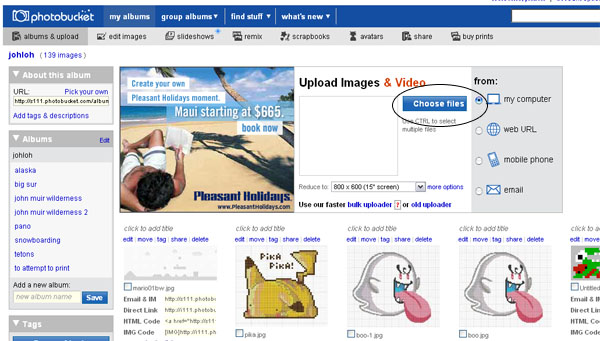
3. pick the file you want to upload, close the ad that pops up.
4. after a second or so the image you uploaded should appear below.
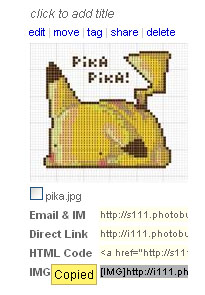
5. click your mouse in the section below your image titled "IMG CODE". A yellow box should appear that says 'COPIED' (it just copied the text for you, you can also select and hit CTRL-C if you want)...it should look like this below...
6. Now back to the forums, and you just hit CONTROL-V (mac is COMMAND-v) wherever you want it in your post.
ALTERNATELY...
If you have your location (http://blahblahblah.com/blah.jpg)...here is how you put it into a post.
1. copy the image location you want (select it and hit CONTROL-C)
2. In the forum hit the 'Img' button you see just above your posting box.
3. now the cursor will be between a {IMG} and a {/IMG} and you can just CONTROL-V paste it in between.
make sense? give it a shot...ask questions here if you still have trouble...once you get it down this should be a easy and quick way to get images up on this and other forums you use...
 !
!
1. go to http://www.photobucket.com, sign up (its free), and log in.
2. at your personal screen youll see photos you've uploaded below (none if youre new), click the blue CHOOSE FILES button.
3. pick the file you want to upload, close the ad that pops up.
4. after a second or so the image you uploaded should appear below.
5. click your mouse in the section below your image titled "IMG CODE". A yellow box should appear that says 'COPIED' (it just copied the text for you, you can also select and hit CTRL-C if you want)...it should look like this below...
6. Now back to the forums, and you just hit CONTROL-V (mac is COMMAND-v) wherever you want it in your post.
Code: Select all
[IMG]http://i111.photobucket.com/albums/n131/johloh/pika.jpg[/IMG]If you have your location (http://blahblahblah.com/blah.jpg)...here is how you put it into a post.
1. copy the image location you want (select it and hit CONTROL-C)
2. In the forum hit the 'Img' button you see just above your posting box.
3. now the cursor will be between a {IMG} and a {/IMG} and you can just CONTROL-V paste it in between.
make sense? give it a shot...ask questions here if you still have trouble...once you get it down this should be a easy and quick way to get images up on this and other forums you use...
!
