Page 1 of 1
Ariel Sprite Request
Posted: Wed Jan 08, 2014 11:33 am
by jmann
I am trying to create a pattern of Ariel. I created it with MacStitch but the colors are messed up and it doesn't have the full 23 colors. I generated a pattern with another program, and the color list came out great, but it doesn't export with symbols on color chart like I prefer.
Can someone try generating a pattern with KG-Chart or PCStitch for me? I prefer a pdf or jpg chart, symbol-on-color, and all 23 colors. I have attached the list of colors that I generated that were accurate, and the sprite image.
Thanks in advance.

- Ariel.jpg (23.3 KiB) Viewed 4217 times
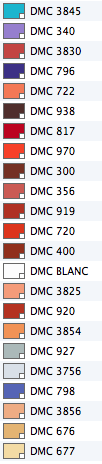
- Screen Shot 2014-01-08 at 11.43.26 AM.png (20.62 KiB) Viewed 4217 times
Re: Ariel Sprite Request
Posted: Wed Jan 08, 2014 12:18 pm
by Pyper
I ran it though KGChart, but it needs a little fixing up (some random colours turning up where they shouldnt, others not turning up everywhere they should), so I will tidy it up for you after work today.
Re: Ariel Sprite Request
Posted: Wed Jan 08, 2014 12:38 pm
by jmann
Thanks so much! I'm looking forward to it!
Re: Ariel Sprite Request
Posted: Thu Jan 09, 2014 3:17 am
by Pyper
Here are the patterns in jpeg and pdf.
Just take a look over them, the second darkest red only patterned in half the time so I fixed it up by hand from your image. I think I got all the pixels. Also interesting thing - once I chased down some odd points (much lighter pixel in the middle of a dark area not visible in your image sort of thing) it came down to 15 colours. Initially the pattern program was assigning several colours to what appears as a single colour. This is probably because your sprite is in jpeg format, which can introduce slight variations that the programs pick up on. If you want me to remake it and leave it as KG thinks it should be I can upload that tomorrow.
Re: Ariel Sprite Request
Posted: Thu Jan 09, 2014 7:43 am
by jmann
Pyper wrote:Here are the patterns in jpeg and pdf.
Just take a look over them, the second darkest red only patterned in half the time so I fixed it up by hand from your image. I think I got all the pixels. Also interesting thing - once I chased down some odd points (much lighter pixel in the middle of a dark area not visible in your image sort of thing) it came down to 15 colours. Initially the pattern program was assigning several colours to what appears as a single colour. This is probably because your sprite is in jpeg format, which can introduce slight variations that the programs pick up on. If you want me to remake it and leave it as KG thinks it should be I can upload that tomorrow.
Ariel.pdf
OMG this is absolutely perfect. I'm so excited to do this. I can't thank you enough! Thank you it's beautiful.
Re: Ariel Sprite Request
Posted: Thu Jan 09, 2014 12:31 pm
by Pyper
No worries

ps Don't trust the colour selection or listed dimensions on the KG Chart pattern, the default settings are wierd.
Re: Ariel Sprite Request
Posted: Thu Jan 09, 2014 12:47 pm
by jmann
The hair colors seem a bit darker than the sprite, but they should be pretty easy to swap out from some of the colors in my list. Do you have KG-chart file for it? I am going to try to get access to a PC tonight to do the color swaps in the program itself.
Thanks,
Re: Ariel Sprite Request
Posted: Thu Jan 09, 2014 10:13 pm
by Pyper
Here ya go